

 Tiếng Việt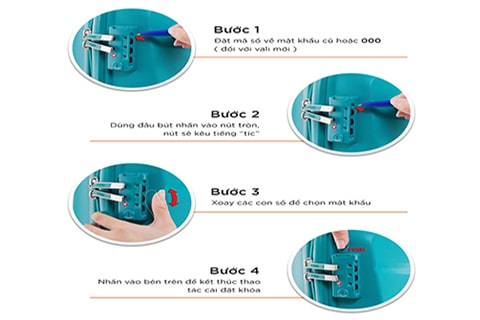
Recently, a number of our loyal customers have sent in questions asking us to share more details on how to change the password on a TSA luggage lock — one of the most widely used luggage lock types today. In response to the trust our customers have placed in us, within the scope of this article we will walk you through the most comprehensive guide to changing the TSA luggage lock password for all available lock types. You can also find additional methods for changing other suitcase lock passwords here. Let’s dive into the details together with May Hop Phat.
Why You Should Buy a Suitcase with a TSA Lock

The TSA combination lock is highly regarded by experts for its quality. It is considered the safest lock type for products such as roller suitcases and travel luggage. Today, the vast majority of premium suitcases use this accessory, thanks to its high safety characteristics. Among all luggage lock types currently available, the TSA luggage lock is recognized as the one with the highest level of security — because only you, and only you, or airport security personnel (with specialized tools) can open it. Furthermore, the process of changing the TSA luggage lock password is quite simple. If you are unfamiliar with it and looking to learn, read on to the next section.
The Most Comprehensive Guide to Changing Your TSA Luggage Lock Password
Changing the TSA Lock Password on Zipper-Type Suitcases
Press-and-Release TSA Combination Lock

Press-and-release TSA combination lock
In general, this lock type is relatively similar to other standard combination locks. To change the TSA luggage lock password on this type, simply reset the digits back to all zeros. If you have already changed the password before, just rotate the dials back to the previous password. Then insert the tip of a ballpoint pen into the small hole nearby, hold it firmly, and turn the button to initiate the password change. Finally, press the button at the top of the TSA lock to confirm and set your new password.
Press-and-Hold TSA Lock

Press-and-hold TSA lock
This lock type typically integrates a side sliding button. After setting the number sequence back to 000 or your previous password, simply slide this button to the right, hold it, and change to your new password. Then release the button or slide it back to the left to lock in the new password.
Rotate-and-Hold TSA Lock Password Change

Rotate-and-hold TSA lock password change
For this type of accessory, you only need to rotate the round button to hold it and proceed to change the TSA luggage lock password. Once done, simply return the round button to its original position and you are finished.
Guide to Changing the Password on Aluminum Alloy TSA Luggage Locks
This premium TSA accessory line is divided into four types. Each type has its own setup and TSA luggage lock password change method. Specifically:
TSA Push-Type Aluminum Alloy Lock (Also Known as the 90-Degree Lock / 1-Point Lock)

TSA push-type aluminum alloy lock (also known as the 90-degree lock / 1-point lock)
To change the password on this lock type, follow these steps in sequence:
Step 1: Set the number dial back to the old password, or to three zeros (000). Step 2: Rotate the round button on the inside of the suitcase in the direction of the arrow from A to B. Step 3: Rotate the number dials to select your new password. Step 4: Rotate the round button on the inside of the suitcase following the arrow from B back to A. That’s it — quite simple, isn’t it?
TSA Snap-Type Aluminum Alloy Lock Password Change (Also Known as the 180-Degree Lock / 2-Point Lock)

TSA snap-type aluminum alloy lock (also known as the 180-degree lock / 2-point lock)
The procedure is as follows:
Step 1: Set the number dial back to the old password, or three zeros (000). Step 2: Switch the button inside the lock to “SET” (setup) mode. Step 3: Rotate the number dials to select your new password. Step 4: Finally, switch the round button back to the OFF position. The suitcase lock setup is then complete.
TSA Plastic Snap Lock

TSA plastic snap lock
To change the TSA luggage lock password on this type, follow these 4 basic steps in order:
Step 1: Set the number dial back to the old password, or three zeros (000). Step 2: Slide the button on the inside of the TSA lock. Step 3: Rotate the number dials to select your new password. Step 4: Slide the button back to its original position to complete the lock setup.
TSA Rotating Aluminum Alloy Lock Password Change

TSA rotating aluminum alloy lock password change
Similar to the lock types above, when changing the password on this type of suitcase lock, you also need to set the number dial back to the old password or return it to the default. Then, use a screwdriver to rotate the button in the direction of the arrow. At the same time, rotate the number dials to select your new password. Finally, use the screwdriver to rotate the button back to its original position and you are done.
TSA Padlock-Style Password Change
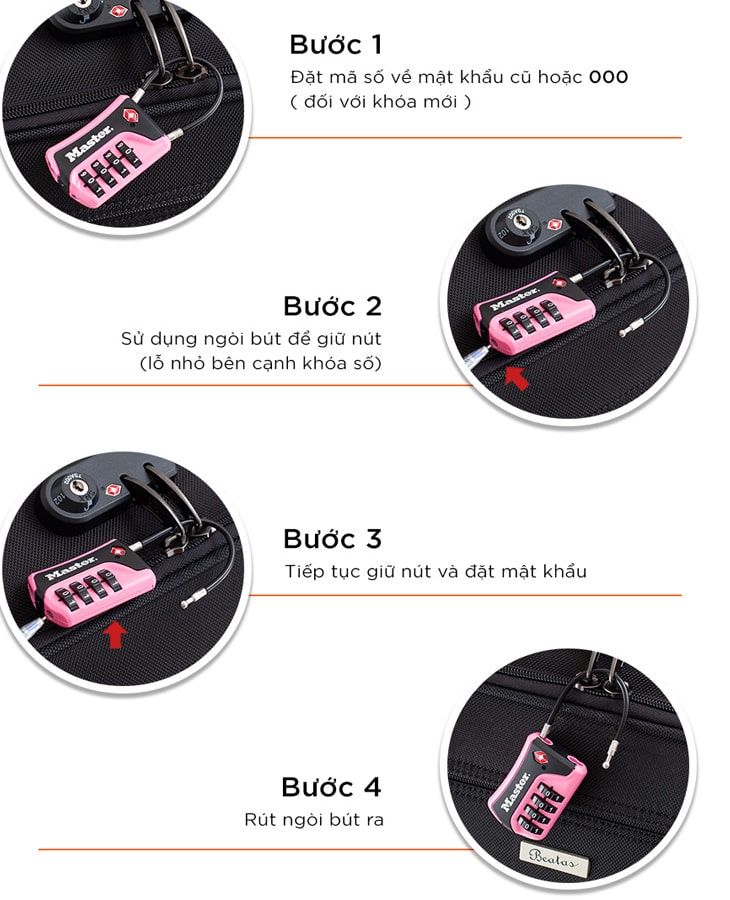
TSA padlock-style password change
The first step is the same as the lock types above. Then use a pen nib to hold the button (which is the small hole located next to the combination dial). Continue holding the button and proceed to change the password. Once you have finished setting it, simply remove the pen nib and you are done.
TSA Key Cylinder Lock Password Change
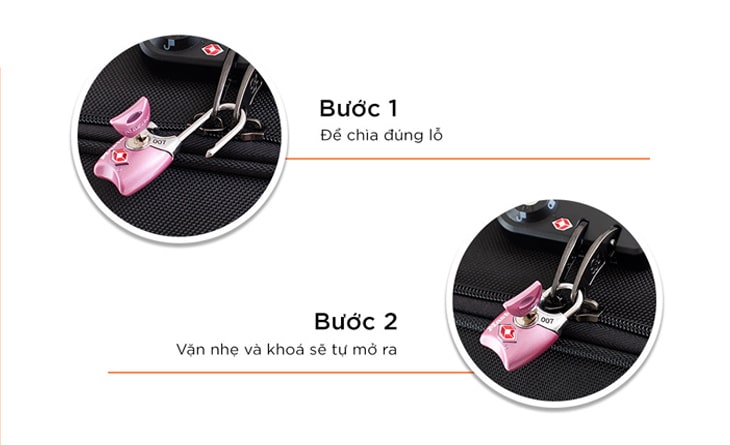
TSA key cylinder lock password change
For this lock type, the TSA luggage lock password change process is also considerably simpler. You only need to insert the key into the correct slot and turn it gently — the lock will automatically open.
Important Notes to Keep in Mind When Using a TSA Luggage Lock
To avoid forgetting your password and having to change it repeatedly, it is best to set a number combination that is easy to remember. Frequently changing the password can affect the security function of the lock. In particular, standard combination lock models tend to offer weaker security. For this reason, it is advisable to choose a separate TSA padlock rather than relying on a regular built-in suitcase lock.
Conclusion
Through the detailed sharing and step-by-step instructions on how to change the TSA luggage lock password above, you should now be able to handle these straightforward situations confidently — and keep your luggage as safe and secure as possible. We wish you every success!